 ultimate-guide
Best Printing Method for Intricate Logo Designs
Table of Contents
- Why Intricate Logos Fail With the Wrong Print Method
- Printing Methods for Fine Lines and Small Text: A Comparison
- DTF vs Screen Printing for Logos: Which Handles Detail?
- DTG and Embroidery: Where They Fit for Complex Logos
- The Best File Format for Custom Apparel Printing
- Cost and Batch Size: Matching the Method to Your Order
- What to Ignore When Choosing a Printing Method
- Conclusion: Choose the Method That Matches Your Logo
- Frequently Asked Questions
Last Updated: September 5, 2026
Fine lines, tiny text, and complex gradients are where most custom apparel projects go to die. A logo that looks crisp on a screen often comes back from the printer looking muddy, cracked, or blurry. The best printing method for intricate logo designs depends on your artwork's complexity, your fabric choice, and your order quantity, but for most high-detail work, Direct-to-Film (DTF) or Direct-to-Garment (DTG) will outperform traditional methods.
At Action Designs, we've spent years matching logos to the right production process. This guide breaks down how each method handles micro-detail, where they fail, and how to prepare files so your logo survives the print process intact.
Below, we'll compare the four main contenders, explain the file formats that give you the best shot at clean reproduction, and show you exactly how to match the method to your order size. But first, here's what most guides get wrong: they recommend a method based on what's popular, not on what your specific artwork requires.
Why Intricate Logos Fail With the Wrong Print Method
The most common failure point isn't the printer. It's the gap between how your logo was designed and what the print method can physically reproduce.
Screen printing relies on pushing ink through mesh (the FDA). The mesh count determines how fine the detail can be, but even high mesh counts struggle with elements thinner than the thread itself. When you have a logo with 6-point text or hairline strokes, the ink either bridges across the openings or the detail simply disappears.
Digital methods like DTG and DTF render detail differently. They lay down ink droplets in a dot pattern rather than squeezing through a stencil, which means they can hold much finer line work. The tradeoff is in ink opacity and durability on dark fabrics.
A second failure point is file preparation. If you hand over a low-resolution PNG with a white background, no printing method on earth will save it. Vector graphics with clean paths are the baseline for any intricate logo design work.
Printing Methods for Fine Lines and Small Text: A Comparison
For logos with fine lines, small text, or gradients, you have four viable options: DTG, DTF, screen printing, and dye sublimation. Each handles detail differently, and none is universally superior.
| Method | Fine Line Detail | Small Text (under 1/4 inch) | Gradient Blending | Best Fabric |
|---|---|---|---|---|
| DTG | Excellent | Excellent | Excellent | 100% cotton |
| DTF | Excellent | Very Good | Very Good | Most fabrics |
| Screen Printing | Limited by mesh | Limited by mesh | Requires halftone dots | Most fabrics |
| Dye Sublimation | Very Good | Good | Excellent | Polyester only |
Direct-to-Garment (DTG) sprays water-based inks directly into the fabric fibers. It handles micro-detail better than any other method because there's no mesh or transfer film to distort the image. The catch is that it works best on cotton; the inks don't bond well with synthetic fibers.
Direct-to-Film (DTF) prints your design onto a transfer film, applies adhesive powder, and heat-presses it onto the garment. Because the image is pre-printed, DTF holds fine detail nearly as well as DTG while working on cotton, polyester, and blends alike.
Screen printing remains the durability champion, but it demands design optimization. Fine lines must be thickened, and gradients must be converted to halftone dots. For a logo with intricate detail, this often means redesigning the artwork to suit the process.
Dye sublimation transfers dye into polyester fibers using heat, producing vibrant, permanent color with no hand-feel. It excels at all-over prints and gradients but only works on light-colored, high-polyester fabrics.
DTF vs Screen Printing for Logos: Which Handles Detail?
For intricate logo designs, DTF is a strong contender over screen printing on detail alone. A DTF printer can reproduce line work down to fractions of a millimeter because it uses a digital print head rather than a physical stencil. Screen printing physically cannot push ink through mesh openings smaller than the mesh threads, which caps its resolution.
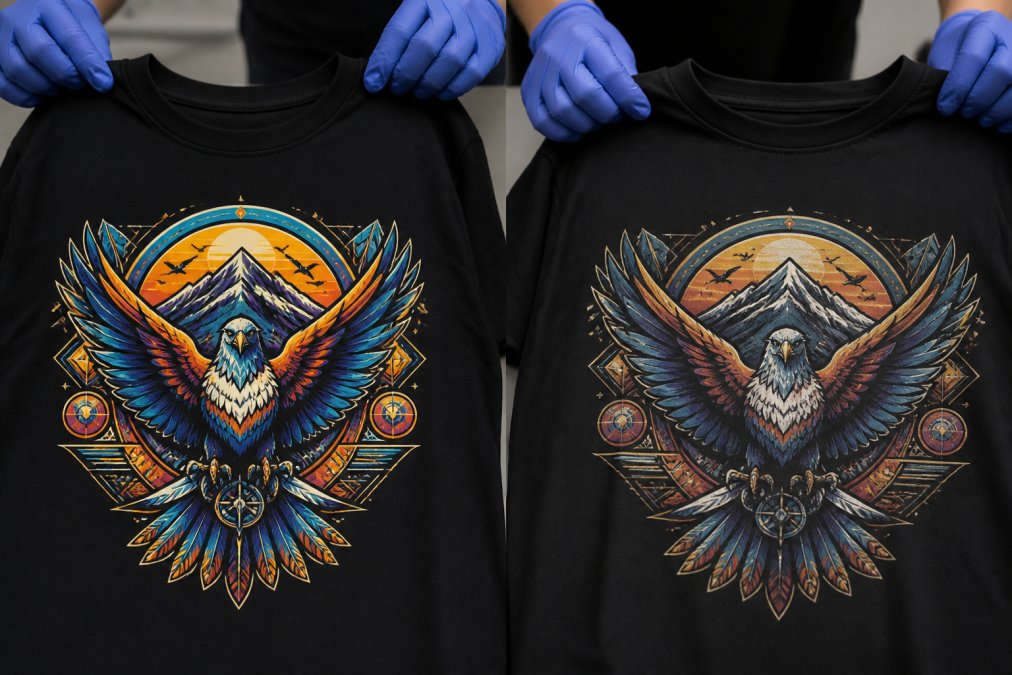
That said, screen printing still has a place. When your logo is relatively simple, when you need 100 or more identical shirts, and when durability through industrial washing matters most, screen printing produces a thicker ink deposit that withstands abuse. DTF prints are durable but sit slightly on top of the fabric, so they can develop micro-cracks over many wash cycles.
The deciding factor is your logo's actual content. If you have a complex emblem with gradients, small text, or overlapping colors, DTF avoids the registration issues that plague multi-screen setups. Screen printing requires one screen per color, and each screen must align perfectly. The more colors in your intricate logo designs, the higher the risk of misregistration.
For most businesses with detailed logos and orders under 100 units, DTF delivers good results because there are no screen setup fees.
DTG and Embroidery: Where They Fit for Complex Logos
Direct-to-Garment printing is a good choice for intricate logo designs on cotton garments, especially when you need photographic detail or smooth gradient blending. DTG prints feel soft to the touch because the ink absorbs into the fabric rather than sitting on top (peer-reviewed research). The limitation is fabric compatibility: DTG inks don't bond well with polyester, and pre-treatment is required for dark garments to prevent the white underbase from washing out.
Embroidery takes a completely different approach. Instead of printing, it stitches your logo using thread. Embroidery excels at conveying a premium, textured feel, and it's the standard for corporate uniforms and hats. But it has a hard ceiling on detail. Fine lines smaller than about 2 millimeters will simply disappear into the thread, and gradients are impossible without specialized digitization that simulates shading through stitch density.
Embroidery density is the key variable (peer-reviewed research). Too dense, and the fabric puckers. Too loose, and the background shows through. For a logo with intricate detail, embroidery requires significant design simplification, which is why we recommend it only for logos that are already bold and geometric.
The practical split is this: use DTG for high-detail, full-color logos on cotton tees and hoodies, and use embroidery for simple, iconic marks on polos, jackets, and headwear. If your logo has more than a few colors or any small text, embroidery may not be the best fit.
The Best File Format for Custom Apparel Printing
The best file format for custom apparel printing is vector-based, specifically an AI, EPS, or SVG file with all fonts converted to outlines. Vector graphics use mathematical paths rather than pixels, so they scale to any size without losing sharpness. This is non-negotiable for intricate logo designs, because the printer's software must be able to isolate each color layer cleanly.
When vector files aren't available, a high-resolution PNG with a transparent background at 300 DPI or higher is the acceptable fallback. Avoid JPEGs entirely; their compression artifacts blur edges and create ghosting around text. Avoid PDFs with embedded fonts unless those fonts are outlined.
For DTF and DTG, your printer will separate the artwork into color channels. A clean vector file with spot colors defined makes this separation accurate. If your logo uses gradients, the printer's RIP software handles the blending, but it needs enough resolution to do so without banding.
The best file format for custom apparel printing also depends on whether you're supplying garments or having them printed. When you send files to a print shop like Action Designs, ask upfront what formats their production team prefers. Most shops will accept AI, PSD, PDF, or high-res PNG, but confirming before you send saves a round of revision.
Cost and Batch Size: Matching the Method to Your Order
Order quantity is the single biggest driver of which method makes financial sense. For small batches, digital methods win because there are no setup costs. For large batches, screen printing's per-unit cost drops dramatically once the screens are paid for.
A common breakdown looks like this:
- 1 to 24 units: DTF or DTG is a sensible option. Screen printing setup fees would make each shirt cost more.
- 25 to 99 units: DTF remains cost-effective. Screen printing becomes viable if your logo uses only one or two colors.
- 100+ units: Screen printing can be an economical choice for simple designs. For complex, multi-color logos, the setup fees multiply per screen, so DTF can still be a good value on total cost.
Small-batch and industrial-scale cost structures differ significantly. Print-on-demand services like Printful or Printify charge per item with no minimums, which suits testing or low-volume sales. But their per-unit pricing runs higher than a dedicated shop that can batch production.
For a trade show with 200 shirts and a seven-color logo, the per-unit quote will reflect the complexity if you go straight to screen printing. That's seven screens, seven setup fees, and seven color stations. DTF prints the whole design in one pass, which is why it's often a better value for complex logos at medium quantities.
What to Ignore When Choosing a Printing Method
Several factors get far more attention than they deserve when you're choosing a printing method for intricate logo designs.
Ignore the hype around "premium" specialty inks unless your logo specifically calls for them. Puff ink, metallic finishes, and high-density ink can add texture, but they complicate the print process and can compromise fine detail. A puff ink that raises the surface will distort thin lines.
Ignore the claim that one method is universally "best." Every method has a use case, and the right answer depends on your fabric, your order size, and your logo's complexity. A shop that only offers one method will always recommend that method.
Ignore wash-test guarantees that come without specifics. Ask what the actual wash-fastness test involved. A print that survives 10 washes is different from one that survives 50. Durability claims mean nothing without a test protocol behind them.
Ignore the urge to add colors you don't need. Every additional spot color in screen printing adds a screen and a setup fee. If your logo has gradients, digital methods handle them in a single pass. Simplify your palette when it doesn't hurt the design.
Ignore print-on-demand platforms for bulk orders. They're built for individual order fulfillment, not for producing 500 identical shirts at a competitive price. A dedicated production shop with scalable production will offer competitive per-unit costs.
Conclusion: Choose the Method That Matches Your Logo
The best printing method for intricate logo designs comes down to three variables: your artwork's detail level, your fabric, and your order quantity. For fine lines, small text, and gradients under 100 units, DTF or DTG will serve you best. For simple marks at high volume, screen printing delivers durability and can be cost-effective. For premium texture on bold logos, embroidery shines.
The real mistake is forcing a logo to fit a method instead of letting the method serve the logo. Bring a clean vector file, be honest about your order size, and ask your printer which process they'd recommend for your specific artwork.
At Action Designs, we handle the full spectrum, from single shirts to full collections, across screen printing, embroidery, DTG, and DTF. We can supply the garments or customize items you provide, and our team will help you prepare your files so your intricate logo designs come out sharp the first time. Get a quote and see which method matches your logo best.
Frequently Asked Questions
What is the best printing method for intricate logo designs with fine details?
For intricate logo designs, DTF and DTG printing are strong choices. DTF excels on various fabrics, including polyester, while DTG is ideal for cotton. Both handle gradients and fine lines well. Screen printing can work but requires high mesh counts and expert setup, which can be costly for complex designs. Embroidery struggles with very small text and gradients.
What's better for fine details: DTF or screen printing?
For fine details, DTF is generally a good choice over screen printing. DTF's digital process reproduces tiny lines and gradients exactly as they appear in your file. Screen printing relies on halftone dots and mesh counts, which can blur or drop very fine details. DTF is a strong choice for small text and complex multi-color logos.
Which file format is best for custom apparel printing?
A vector file, such as AI, EPS, or PDF, is the best file format for custom apparel printing. Vector graphics use mathematical lines, so they scale to any size without losing sharpness, which is critical for intricate details. If a vector is unavailable, a high-resolution PNG with a transparent background works, but the design is fixed at that resolution.
Can embroidery handle intricate logo designs?
Embroidery can handle intricate logos, but it has limits. It works well for bold shapes and text larger than roughly half an inch. Very small text, tight curves, and gradients are difficult because thread has physical thickness. A digitizer must simplify the design, which can change the look. DTG or DTF may reproduce fine details more accurately.
How do I prepare my logo file for high-detail printing?
Start with a vector file like AI, EPS, or PDF. Convert all text to outlines to prevent font issues. Ensure your logo is at least 300 DPI if you must use a raster file like PNG. For DTF and DTG, flatten layers and remove any background. Confirm your colors are set to CMYK or RGB as your printer requests.
Is screen printing or DTG better for intricate logo designs on cotton shirts?
DTG is often a good choice for intricate logo designs on cotton. It prints full-color, high-detail graphics directly without setup fees. Screen printing requires separating the design into spot colors and creating screens, which can be expensive for complex logos. For large quantities over 50 units, screen printing may become cost-effective if the design simplifies well.
This article was written using GrandRanker